
This tutorial is designed to ensure every comrade can successfully execute the Session 7 Assignment: visualizing your weekly time distribution (Training, Patrol, Admin, Rest). Follow these tactical steps to turn your raw hours into a professional command chart using Canva.
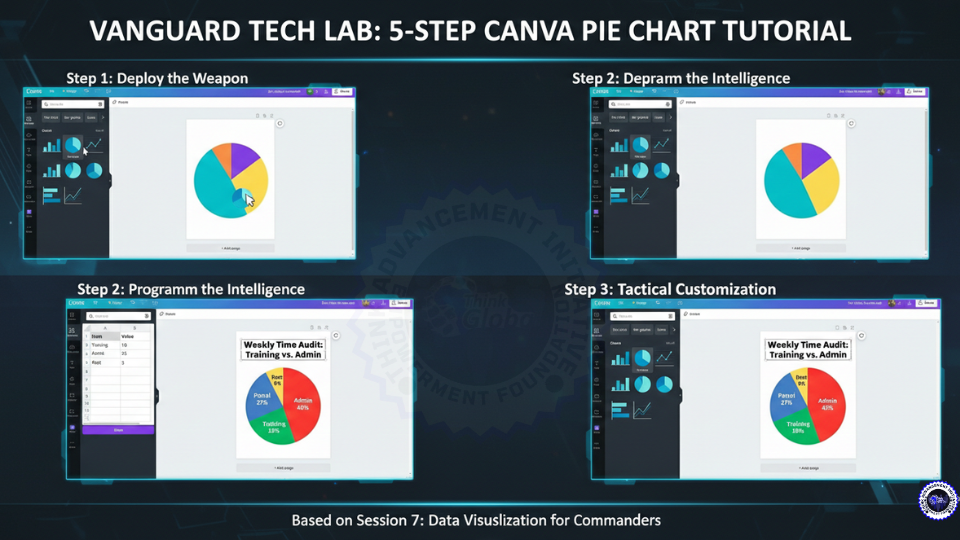
📊 VANGUARD TECH LAB: 5-STEP CANVA PIE CHART TUTORIAL
Step 1: Initiate Mission (Select Your Canvas)
Log in to Canva.com. Click the "Create a design" button and search for "A4 Document" or "Presentation." This will be your reporting sheet.
Step 2: Deploy the Weapon (Select the Chart)
On the left-hand sidebar, click on "Elements." Scroll down until you find the "Charts" section or simply type "Pie Chart" in the search bar. Click the Pie Chart icon to drop it onto your page.
Step 3: Program the Intelligence (Input Your Data)
Once the chart is on your page, a side panel titled "Data" will appear.
- Clear the default values.
- In the first column, type your categories: Training, Patrol, Admin, Rest.
- In the second column, enter the number of hours you spent on each this week.
Step 4: Tactical Customization (Apply the 3-Second Rule)
Now, make the data "speak" according to Vanguard protocols:
- Colors: Click each slice to change colors. Use Red for high-stress areas (Admin) and Green for mission-critical growth (Training).
- Settings: Click the "Settings" tab in the chart panel. Ensure "Show Labels" and "Show Percentages" are toggled ON.
- Title: Add a text box at the top with a clear, direct title (e.g., "Weekly Time Audit: Training vs. Admin").
Step 5: Secure the Asset (Export & Upload)
Click the "Share" button in the top right corner. Select "Download" and choose "PNG" or "PDF Standard." Once downloaded, immediately upload this file to your personal Google Drive folder for review by the Command.
⚠️ ASSIGNMENT RECAP
"Data is useless if it stays in your head. Put it on the map."
Your chart must prove a point. In your "Brief" (one sentence below the chart), explain what the visualization shows.
- Example: "This chart proves that 60% of my time is consumed by Admin, leaving only 10% for Field Training—this must be rebalanced."
Move Higher!
Next Step for You: